Palmorine: A Modern Serif Typeface for Editorial Design
The decision usually comes down to the header. It is that quiet moment in the design process where everything else fades away, and you are left staring at a blank canvas, trying to find the perfect voice for your content. Recently, I was redesigning a digital coaching workbook intended to guide readers through a complex lifestyle transformation. The goal was to create something that felt both authoritative and deeply inviting—a balance that is notoriously difficult to strike with typography alone. After testing several options, my eyes landed on Palmorine, a modern serif typeface that promised exactly what I needed: a marriage of classic sophistication and contemporary minimalism.
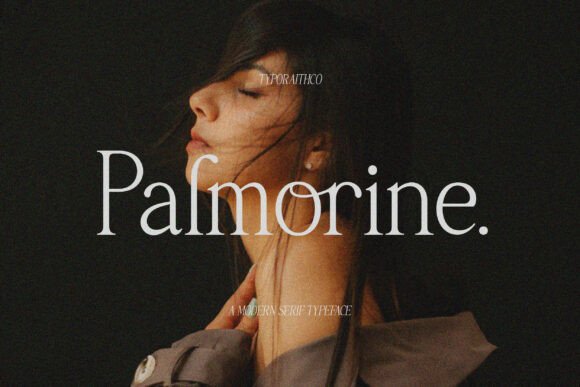
What initially drew me to Palmorine was its high-contrast character. In a sea of flat, uniform sans-serif fonts that often feel cold or overly corporate, this font offered a rhythmic pulse. It possesses the elegant curves of a traditional editorial serif but with the clean lines of modern web design. When I placed it as the main title for the workbook cover, the difference was immediate. The letters didn't just sit on the page; they seemed to breathe, guiding the eye naturally from the top line down to the subtitle. For any designer working on ebook titles or newsletter graphics, finding a font that commands attention without shouting is essential, and Palmorine delivers that presence effortlessly.
Defining the Mood of Your Publication
Typography is more than just legibility; it is the emotional backbone of your brand identity. Palmorine brings a specific mood to the table that feels refined yet accessible. It is not stiff or academic like some older serifs, nor is it playful or whimsical like many script fonts. Instead, it occupies a sweet spot ideal for lifestyle blogs, wedding guides, and digital magazines. When I tested it on a recipe ebook layout, the font elevated the dish descriptions, making them feel curated and premium rather than just a list of ingredients.
The visual hierarchy provided by this font is intuitive. Because of its distinct stroke contrast—where thick vertical strokes meet thin horizontal ones—it creates a natural focal point. This makes it an excellent choice for article titles, chapter openers, and pull quotes. However, I found that while it shines as a display font, it requires careful consideration when used for longer body text. The high contrast can sometimes reduce readability on low-resolution screens if the font size is too small. For extended reading sessions, such as in a long-form blog post or a course PDF, it is best reserved for headings to maintain clarity and comfort.
Real-World Applications in Editorial Layouts
To truly understand the versatility of Palmorine, I experimented with a few different scenarios beyond the initial workbook project. First, I applied it to a printable planner designed for creative entrepreneurs. The headers for each weekly section looked crisp and professional, providing a clear structure that helped users navigate their busy schedules. The font's clean edges translated beautifully to print, ensuring that every word remained sharp even when printed on standard office paper.
I also explored using Palmorine for a wedding guide landing page. Here, the font's sophisticated nature added a layer of trust and elegance that was crucial for the audience. When paired with ample white space, the typeface allowed the content to shine, creating a sense of luxury without needing heavy graphical elements. Whether you are designing a brand identity for a boutique consultancy or creating social media graphics for a fashion brand, this modern typography style ensures your message is received with the right tone.
- Ebook Covers: Use the bold weights to make your book stand out in crowded marketplaces.
- Newsletter Headers: Create a consistent look that subscribers instantly recognize and trust.
- Workshop Materials: Enhance worksheets and handouts with a professional, polished aesthetic.
- Editorial Features: Perfect for magazine layouts where story headlines need to pop against background images.
Building Harmony Through Font Pairing
No single font can do everything, and Palmorine is no exception. Its strength lies in its role as a display or heading font, which means it pairs exceptionally well with simpler, more neutral typefaces for body copy. For my coaching workbook, I chose a clean, geometric sans serif font for the instructional text. This combination created a balanced visual rhythm: Palmorine grabbed the reader's attention with its flair, while the sans-serif body text ensured the information was easy to digest over multiple pages.
This approach is a cornerstone of effective font pairing. If you are designing a web design project, you might pair Palmorine with a highly legible serif for long articles, allowing the headings to provide character while the body maintains focus. Alternatively, for a minimalist packaging design or a tech-focused creative font application, a stark sans-serif companion can amplify the modern edge of Palmorine. The key is to let the high-contrast personality of Palmorine take center stage while the supporting font remains unobtrusive.
Technical Considerations for Digital and Print
Before committing to a final design, it is vital to check the technical specifications of the font family. Palmorine typically includes a range of styles, from light to bold, along with various alternates and ligatures that add subtle touches of personality. These features are invaluable for logo design and custom typography projects where unique letterforms can distinguish a brand. Furthermore, checking for multilingual support is crucial if your content reaches a global audience, ensuring that accents and special characters render correctly across all devices.
For those creating commercial fonts for resale or using them in client publications, understanding the licensing terms is non-negotiable. Most modern typefaces come with specific rules regarding web embedding, app usage, and print runs. Ensuring you have the correct license protects your work and respects the designer's effort. Additionally, always test your files in different formats. While Palmorine looks stunning on a high-definition monitor, verifying how it renders in a PDF export or on a mobile screen is a necessary step to guarantee a seamless user experience.
In the end, choosing a typeface is about solving a problem and evoking a feeling. Palmorine solved my challenge of creating a workbook that felt both structured and inspiring. It brought a sense of calm authority to the layout, encouraging readers to engage deeply with the material. Whether you are a blogger looking to refresh your site, a publisher crafting a new magazine, or a creator building a digital product, investing time in finding the right serif font can transform the entire perception of your work. By selecting a font like Palmorine, you aren't just filling a page with text; you are curating an experience that resonates with your audience long after they have finished reading.