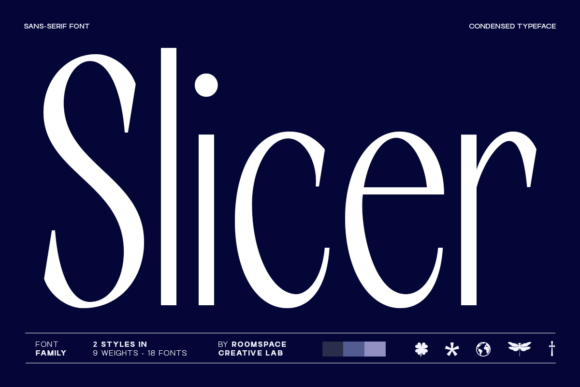
Slicer: The Modern Sans Serif Font for Professional Branding
Running a small business means wearing many hats, but one of the most critical roles you play is that of your own creative director. You are constantly making decisions about how your brand looks and feels to the world. Whether you are designing a logo for your boutique, creating product labels for handmade goods, or drafting social media graphics for your café, every visual element contributes to your overall brand identity. Recently, I found myself struggling with fonts that felt either too generic or too decorative to match the professional image I wanted to project. That was when I discovered Slicer, a condensed sans-serif font family that has completely transformed how my business presents itself online and offline.
What Makes Slicer Different for Small Businesses?
Slicer is not just another typeface; it is a tool designed for modern designers and entrepreneurs who need precision and presence. As a condensed sans-serif font, it offers narrow proportions that allow you to fit more information into tight spaces without sacrificing readability. This is incredibly useful when you are working on product packaging where label space is limited, or when designing Instagram story highlights and mobile-optimized website banners. The sharp contrast in its letterforms gives it a sleek, contemporary mood that immediately elevates the perceived value of your products.
Unlike traditional serif fonts that can sometimes feel heavy or dated, or script fonts that can be difficult to read at small sizes, Slicer strikes a perfect balance. It creates a strong visual hierarchy that guides your customer's eye exactly where you want it to go. When used correctly, this modern typography helps your business look trustworthy, established, and intentional. It signals to your audience that you care about the details, which is essential for building long-term customer loyalty.
Applying Slicer Across Your Brand Touchpoints
The versatility of Slicer makes it an ideal choice for almost every aspect of your branding materials. Here is how I have successfully integrated this commercial font into my daily operations:
- Logo Design: For a clean, minimalist logo, Slicer works beautifully as a primary display font. Its narrow structure allows for compact logos that scale well from a favicon to a large storefront sign.
- Packaging Design: When creating labels for candles, beauty products, or food items, the condensed width is a lifesaver. It lets you include necessary legal text and ingredient lists alongside your brand name without cluttering the design.
- Social Media Graphics: In the fast-paced world of Pinterest and Instagram, you need headlines that grab attention quickly. Slicer's bold presence cuts through the noise of a crowded feed, making your posts stand out.
- Website Visuals: Using Slicer for web headers and navigation menus provides a modern touch that aligns with current web design trends. It ensures your site looks professional on both desktop and mobile devices.
- Marketing Collateral: From flyers and business cards to thank-you cards included in shipments, this font adds a layer of sophistication that makes your physical mailers feel premium.
Building Trust Through Consistency
One of the biggest challenges for independent creators is maintaining consistency across different platforms. A common mistake is mixing too many different styles, such as pairing a handwritten font with a standard sans serif, which can make a brand look disjointed. Slicer helps solve this by providing a cohesive backbone for your visual language. When your customers see the same sharp, clean lines on your website, your packaging, and your email newsletters, they subconsciously recognize your brand as reliable and stable.
For example, if you run a coaching business, using Slicer for your course titles and session notes conveys clarity and focus. If you own a bakery, applying this typeface to your menu board and cupcake wrappers suggests a modern, artisanal approach rather than a rustic, old-fashioned one. The key is to use the font consistently so that your brand becomes instantly recognizable. This recognition is what turns casual browsers into repeat buyers.
Practical Tips for Readability and Usage
While Slicer is visually striking, it is important to remember that legibility is paramount, especially when dealing with small print on product labels or thumbnails on mobile screens. Because it is a condensed font, it naturally takes up less horizontal space, but you must ensure you are not squeezing the letters too tightly. Always test your designs at the actual size they will appear in the real world. A headline that looks great on a computer screen might become illegible when printed on a small sticker.
I recommend using Slicer primarily as a headline, logo, or accent font to establish tone and hierarchy. For body text, such as detailed descriptions on a website or long paragraphs in a newsletter, consider pairing it with a highly readable serif font or a neutral sans serif font. This combination creates a dynamic contrast that keeps the reader engaged while ensuring the information is easy to digest. For instance, pairing Slicer with a classic serif font can add a touch of elegance to a luxury skincare brand, while pairing it with a simple geometric sans serif can create a tech-forward look for a startup.
Testing Before You Commit
Before you download Slicer and apply it to your entire brand identity, take the time to test it. Create a mockup of your most important assets, such as a product label or a social media post, and see how the font performs in context. Does it feel right for your specific industry? Does it convey the mood you want to evoke? Sometimes a font that looks good in isolation might not work well with your specific color palette or imagery.
Additionally, always check the commercial font licensing before using the typeface on merchandise, client work, or digital downloads. Most high-quality fonts come with specific terms regarding how they can be used, whether for personal projects or commercial ventures. Ensuring you have the proper license protects your business from legal issues and shows professionalism to your clients and partners.
Elevating Your Business Identity Today
Choosing the right font is one of the simplest yet most impactful ways to improve your brand's image. Slicer offers the precision and presence that small businesses need to compete with larger corporations. By adopting this modern typography, you are investing in a cleaner, more professional look that resonates with today's discerning consumers. Whether you are updating your logo, redesigning your packaging, or refreshing your social media templates, Slicer provides the structural integrity and style needed to make your brand memorable. Embrace the power of a well-chosen typeface to tell your unique story with confidence and clarity.